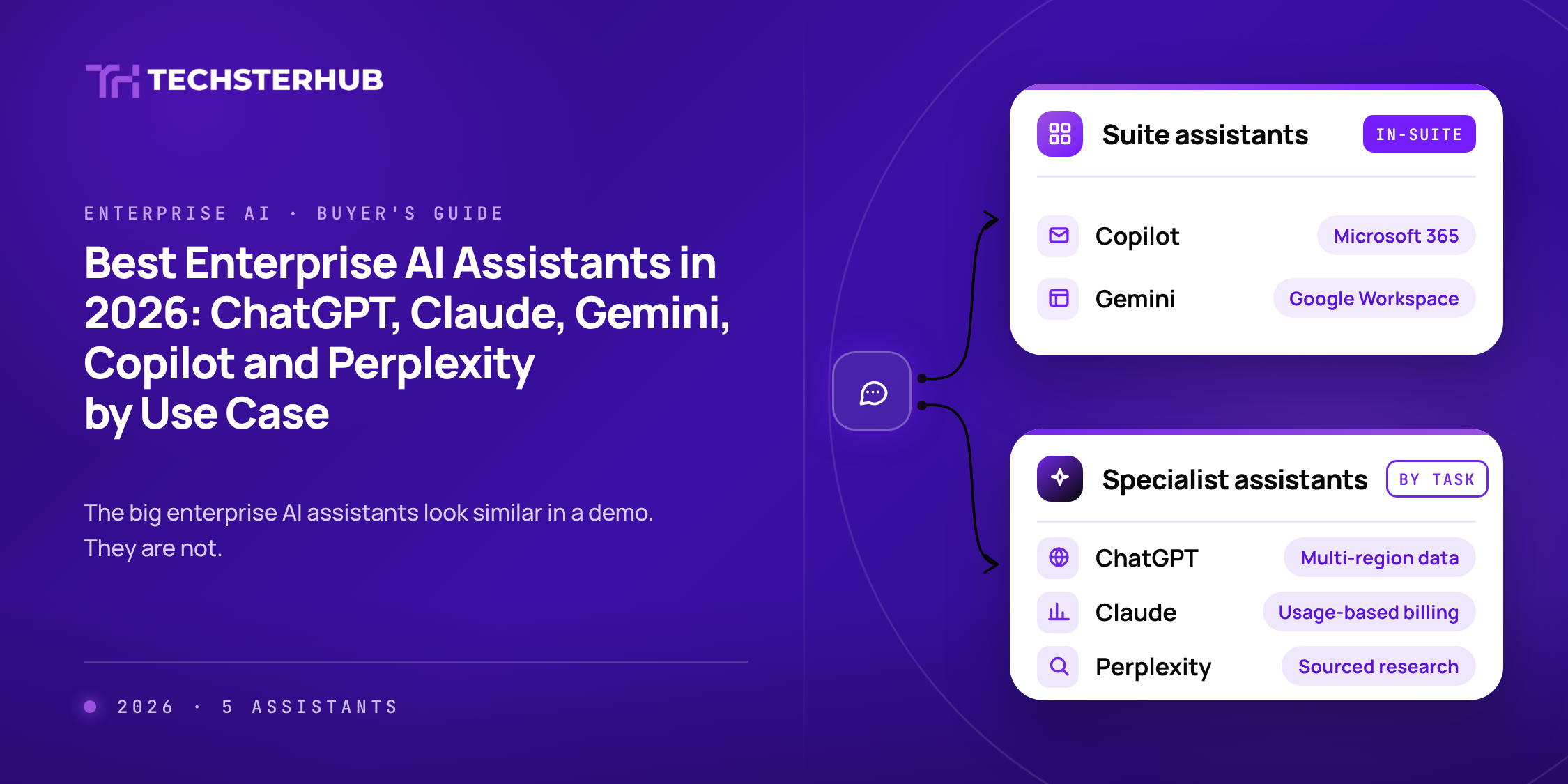
Most companies now pay for at least one AI assistant, and many have three or four running at once: one bought by IT, one inside the office suite, and a couple that teams signed up for on their own.
In a demo, the major assistants look much alike. They all chat, summarize, write, and analyze files. The real differences show up in three places: where the assistant lives in your daily tools, what admin and data controls come with the business plan, and how you pay for it.
This guide compares five enterprise AI assistants by use case, using each vendor’s published plans and documentation, so IT and business leaders can match the tool to the work.
| Quick answer
There is no single best enterprise AI assistant. Microsoft 365 Copilot fits companies whose work runs in Outlook, Teams, Word, and Excel, while Gemini Enterprise fits companies on Google Workspace. ChatGPT Enterprise and Claude Enterprise are the strongest general-purpose assistants for writing, analysis, and coding, and Perplexity Enterprise suits teams that need sourced web research. Choose by where your work happens, then check the admin controls on the plan you would actually buy. |
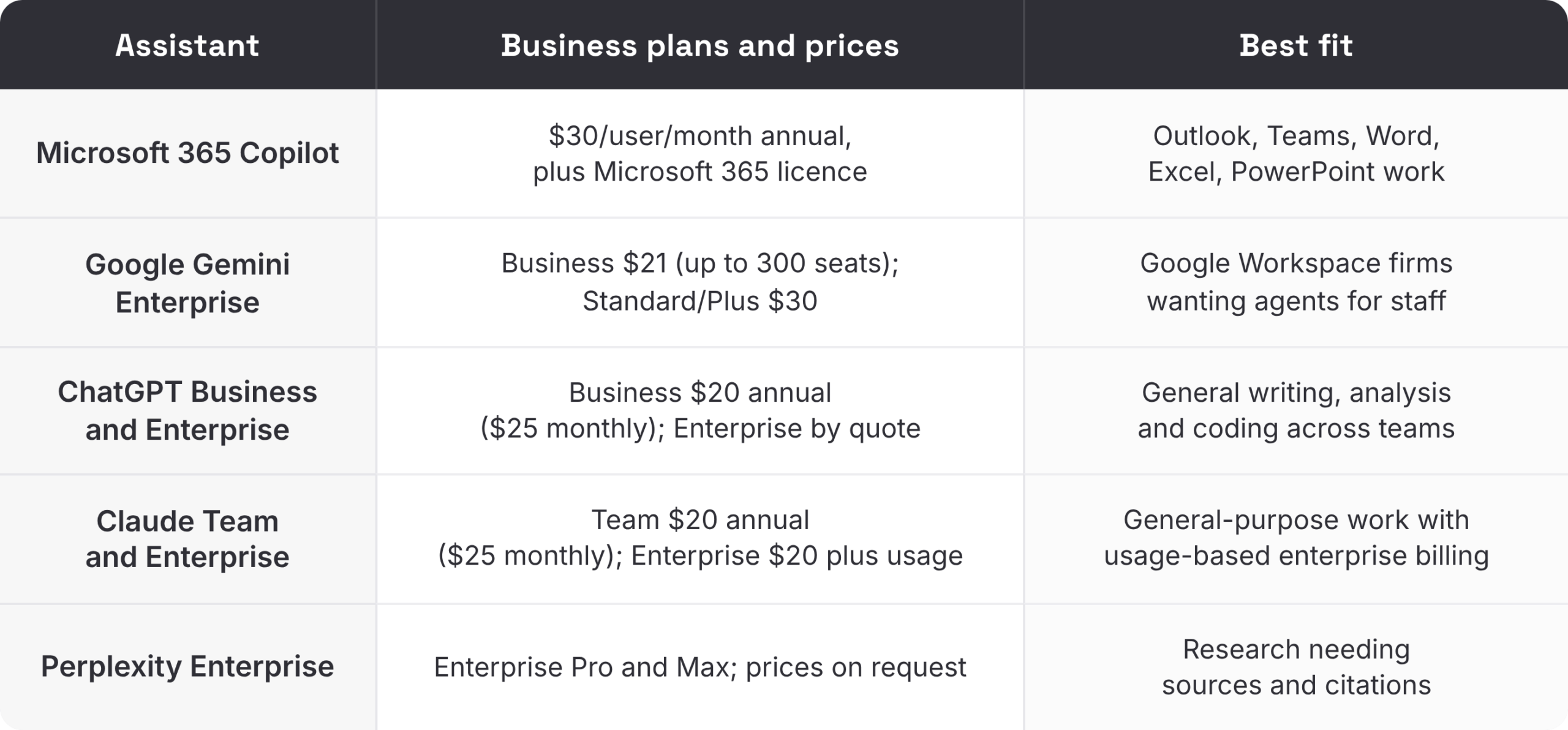
The 5 assistants at a glance
How we compared the enterprise AI assistants
This comparison is based on each vendor’s public pricing pages, product pages, and help documentation, checked on 7 October 2026. It is not a benchmark test of answer quality, which changes with every model release. We looked at four things:
- Where the assistant works: inside an office suite, as a standalone app, or both
- What the business plan includes for admins: provisioning, logs, retention, and data location
- How pricing works: flat seat, seat plus usage, or quote
- Which business tasks each one is designed around
Best for email, meetings, and documents in Microsoft 365: Microsoft 365 Copilot
Microsoft 365 Copilot works inside Word, Excel, PowerPoint, Outlook, and Teams and searches across work data through more than 100 connectors. The plan also includes agents, custom agents, and Copilot Notebooks. Microsoft states that data is encrypted, isolated between tenants, and not used to train foundation models. Copilot Chat is available at no extra cost to users with eligible Microsoft 365 subscriptions.
- Choose it if most of your work happens in Microsoft 365 and you want AI where people already are.
- Watch for: the $30 add-on sits on top of your existing Microsoft 365 license, so check total cost per user.
- Source: Microsoft 365 Copilot for enterprise
Best for Google Workspace companies: Gemini Enterprise
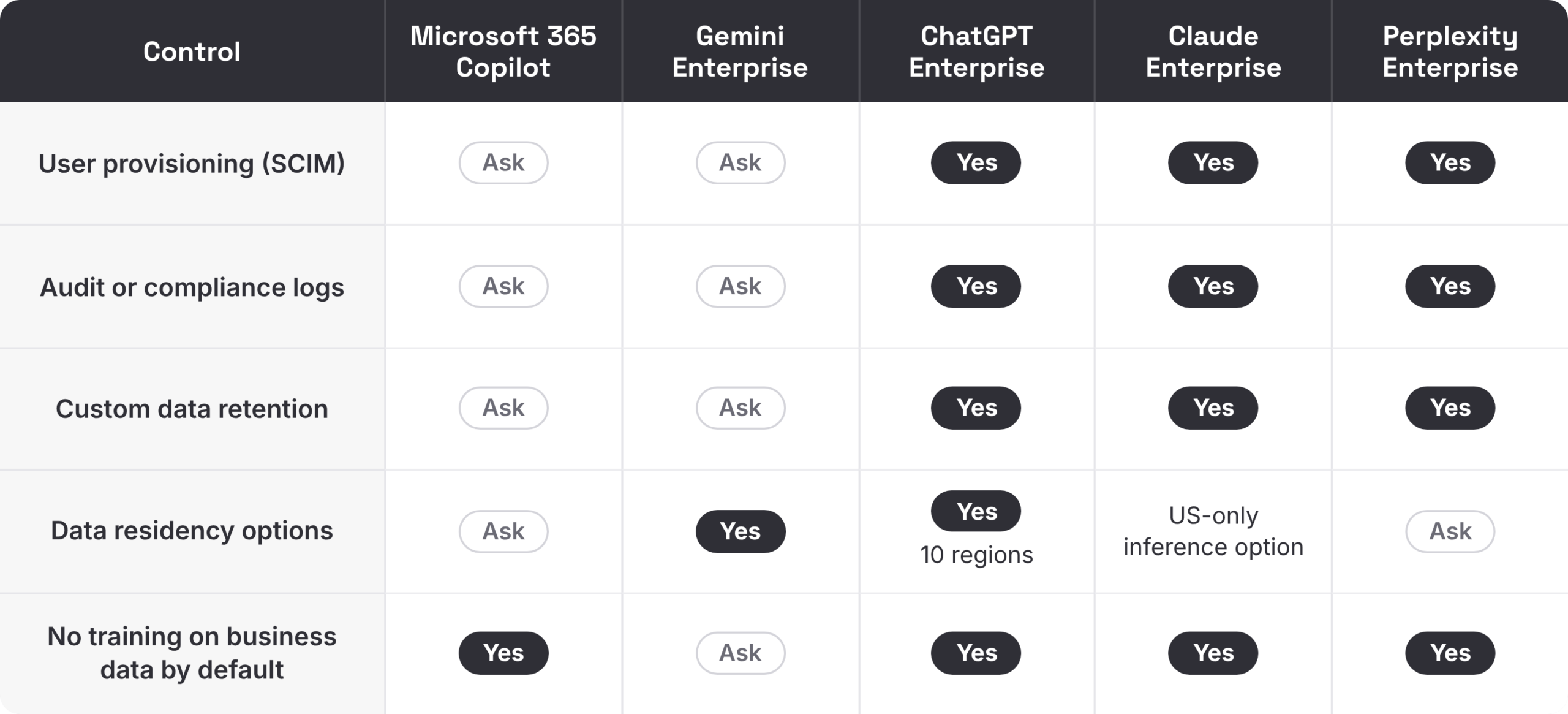
Gemini Enterprise is Google’s platform for finding, building, and running agents at work, with a no-code Workflow Builder and prebuilt agents such as Deep Research and Gemini Notebook. Connectors reach Google Drive, OneDrive, SharePoint, HubSpot, and Jira. Google lists data residency, customer-managed encryption keys, VPC Service Controls, and support for HIPAA and FedRAMP High.
- Choose it if: your company runs on Google Workspace or Google Cloud and wants agents for many employees.
- Watch for: the Business edition is capped at 300 seats; larger companies need Standard or Plus.
- Source: Gemini Enterprise
Best general-purpose assistants: ChatGPT Enterprise and Claude Enterprise
For open-ended work such as drafting, analysis, research across files, and coding, most companies shortlist ChatGPT and Claude. Both are standalone assistants that connect to the tools teams already use, and both separate a smaller team plan from an enterprise plan with stronger controls.
ChatGPT Business and Enterprise
ChatGPT Business includes projects and shared projects, file uploads, data analysis, image generation, and Codex for coding. The Enterprise plan adds SCIM provisioning, role-based access, Enterprise Key Management, custom data retention, data residency in ten regions, a Compliance API, an analytics dashboard, and IP allowlisting. OpenAI states it does not train on business data by default.
- Choose it if you want one assistant for many teams with data residency options across several regions.
- Watch for: Enterprise pricing is by quote, so compare against business for smaller teams.
- Source: ChatGPT business pricing
Claude Team and Enterprise
The Claude Team includes single sign-on, central billing, admin controls for connectors, and no model training on content by default. Claude Enterprise adds SCIM, audit logs, custom data retention, a Compliance API, role-based permissions, IP allowlisting, and a HIPAA-ready option. Enterprise users also get Claude Code, and connectors include Google Drive, Gmail, Google Calendar, GitHub, Microsoft 365, and Slack. Enterprise billing combines a seat fee with usage charged at API rates, with spend limits at the organization and user level.
- Choose it if you want a general-purpose assistant with usage-based billing and admin spend controls.
- Watch for: model your expected usage, since enterprise cost depends on how much people use it.
- Sources: Claude pricing and Claude Enterprise plan overview
For a deeper look at one of these, read our Anthropic Claude review.
Best for sourced research: Perplexity Enterprise
Perplexity’s enterprise plans focus on research with web sources and citations, combined with internal files through app connectors. Perplexity states it never trains its models on enterprise customer data and lists SSO, SCIM, user activity audit logs, configurable file retention, and SOC 2 Type II certification.
- Choose it if analysts, strategy, or marketing teams need answers they can trace back to sources.
- Watch for: it works best alongside a suite assistant rather than replacing one.
- Source: Perplexity Enterprise
Admin and data controls compared
These are the controls IT and security teams ask about first. “Yes” means the vendor states it on the pages we reviewed for its top business plan. “Ask” means we did not find it there, which does not mean it is missing.
Which assistant for which job
Should you buy two assistants?
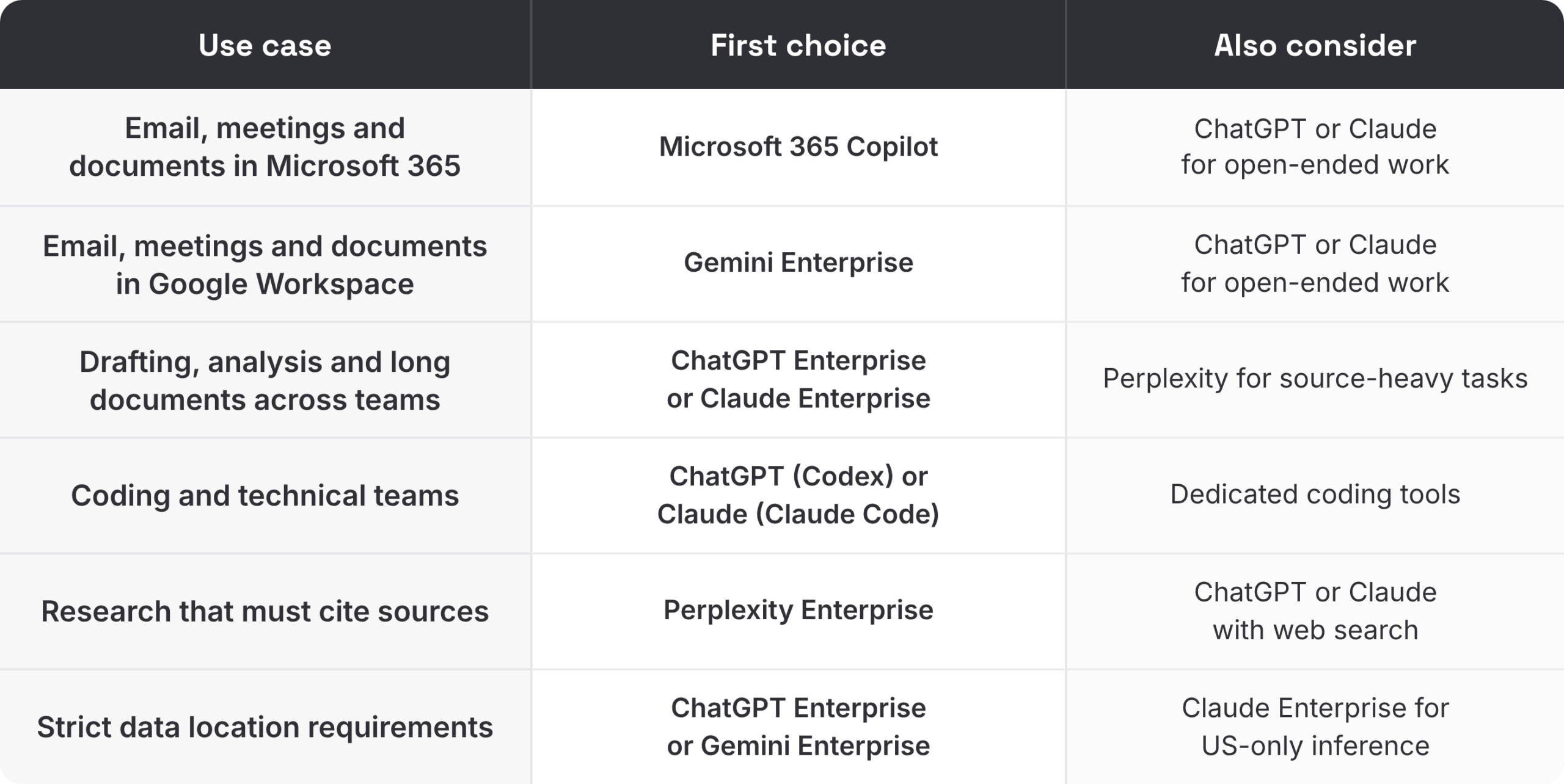
Often, yes. A common pattern is one suite assistant for everyone, either Copilot or Gemini, plus a general-purpose or research assistant for the teams that do heavy writing, analysis, or coding. That can cost less than giving everyone the most expensive plan, and it matches tools to the work.
The risk is unmanaged sprawl. When staff sign up for their own tools, company data ends up in accounts IT cannot see. Set one policy, publish an approved list, and give every approved tool the same basic controls. Our AI governance framework covers how to set that up.
What the published prices mean for a 200-person company
Seat prices look similar until you multiply them. Here is the list-price cost of giving 200 people each option for a year, using the prices above. It excludes tax, discounts, and any usage charges.
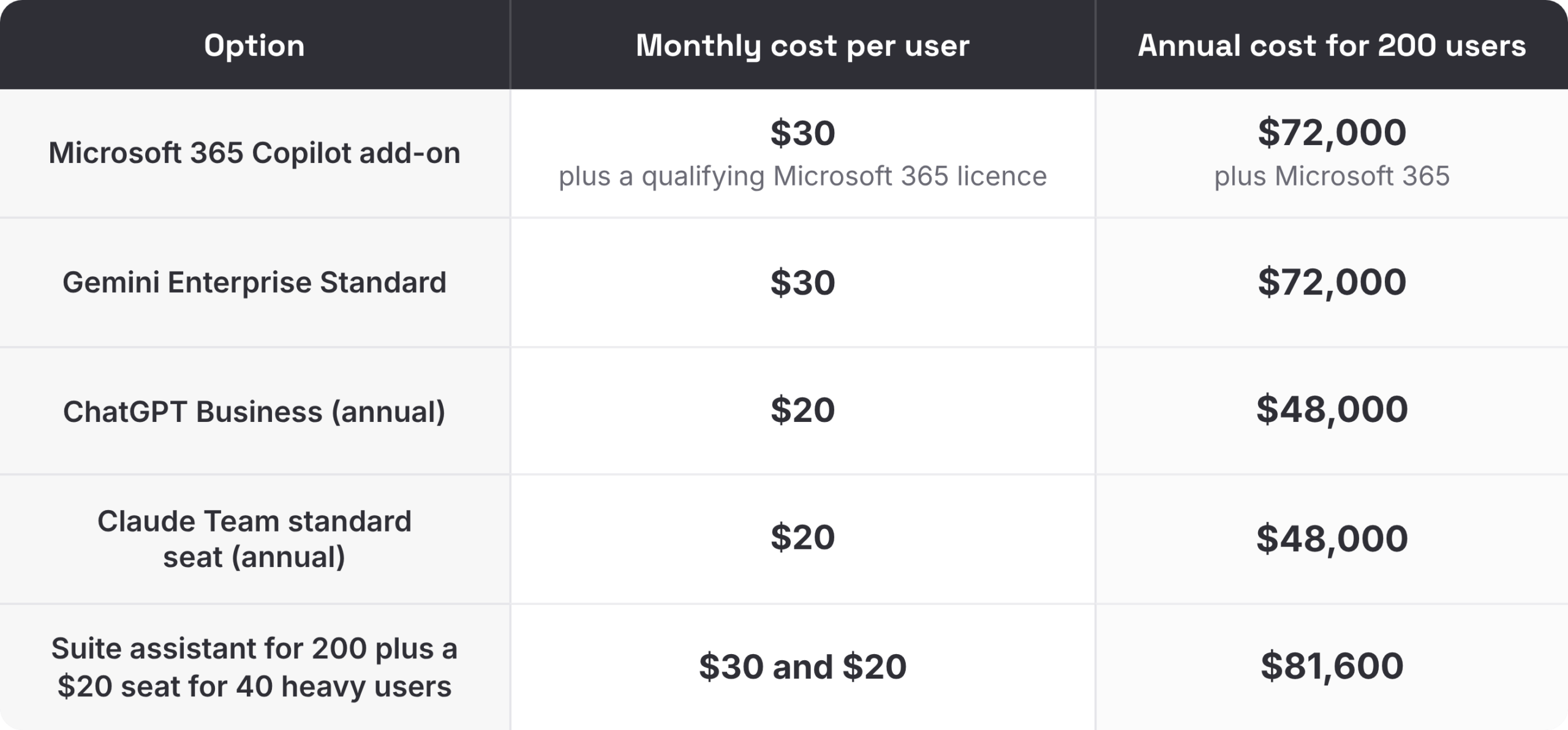
Enterprise plans for ChatGPT and Perplexity are priced by quote, and Claude Enterprise adds usage on top of the seat fee, so ask each vendor for a quote based on your own user numbers.
How to roll out enterprise AI assistants in 60 days
Common mistakes when buying enterprise AI assistants
Buying licenses for everyone on day one
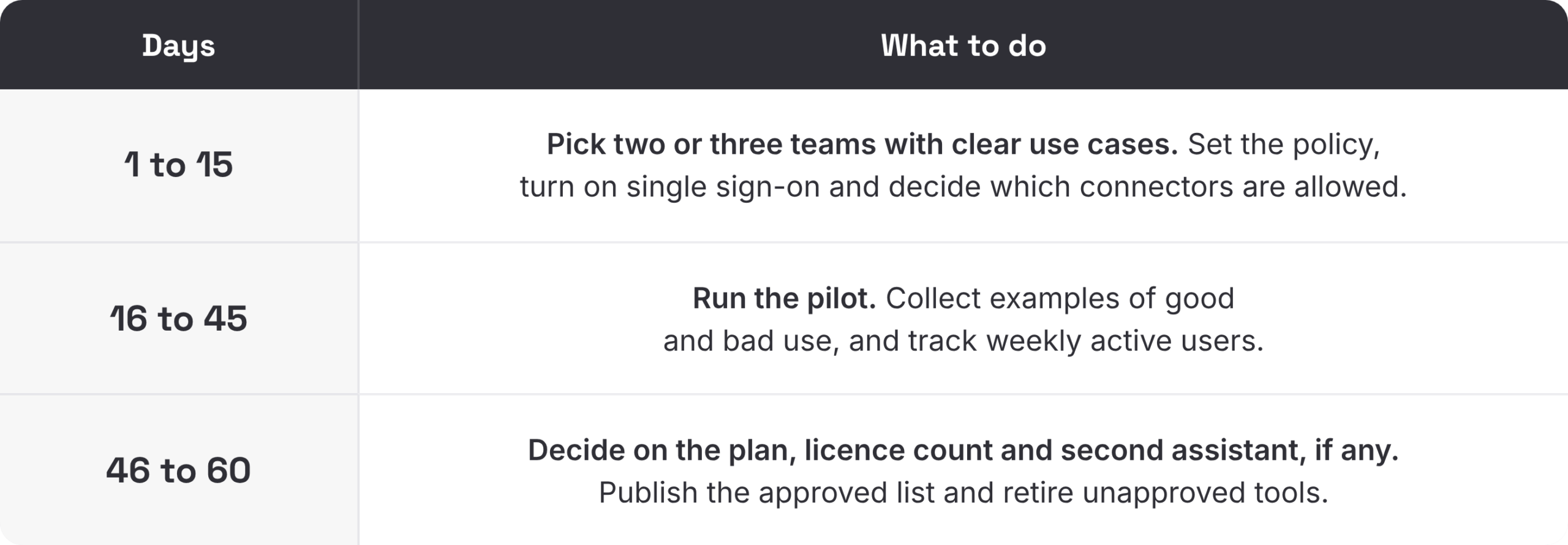
Usage is rarely even. Many staff use an assistant a few times a week, while some teams rely on it all day. Start with a pilot, measure weekly active use, and size the license count from real data.
Judging on the demo plan
Vendors often demo their top tier. Check that the controls and features you care about are on the plan you will actually buy.
No policy for what goes in
Most risk comes from what people paste into an assistant, not from the tool itself. Publish simple rules on customer data, confidential documents, and code before rollout, not after.
Five questions to ask before you sign
- Which features in the demo are on the plan we would actually buy?
- How do we provision and remove users, and is SCIM included?
- Where is our data stored and processed, and can we choose the region?
- What logs can our security and compliance teams access?
If pricing includes usage, what do our heaviest users cost per month?